
Kia Unveils Disney, Marvel, Pixar, Star Wars™ and National Geographic Display Themes
Your Kia’s dashboard might be able to do something you didn’t even know was possible.
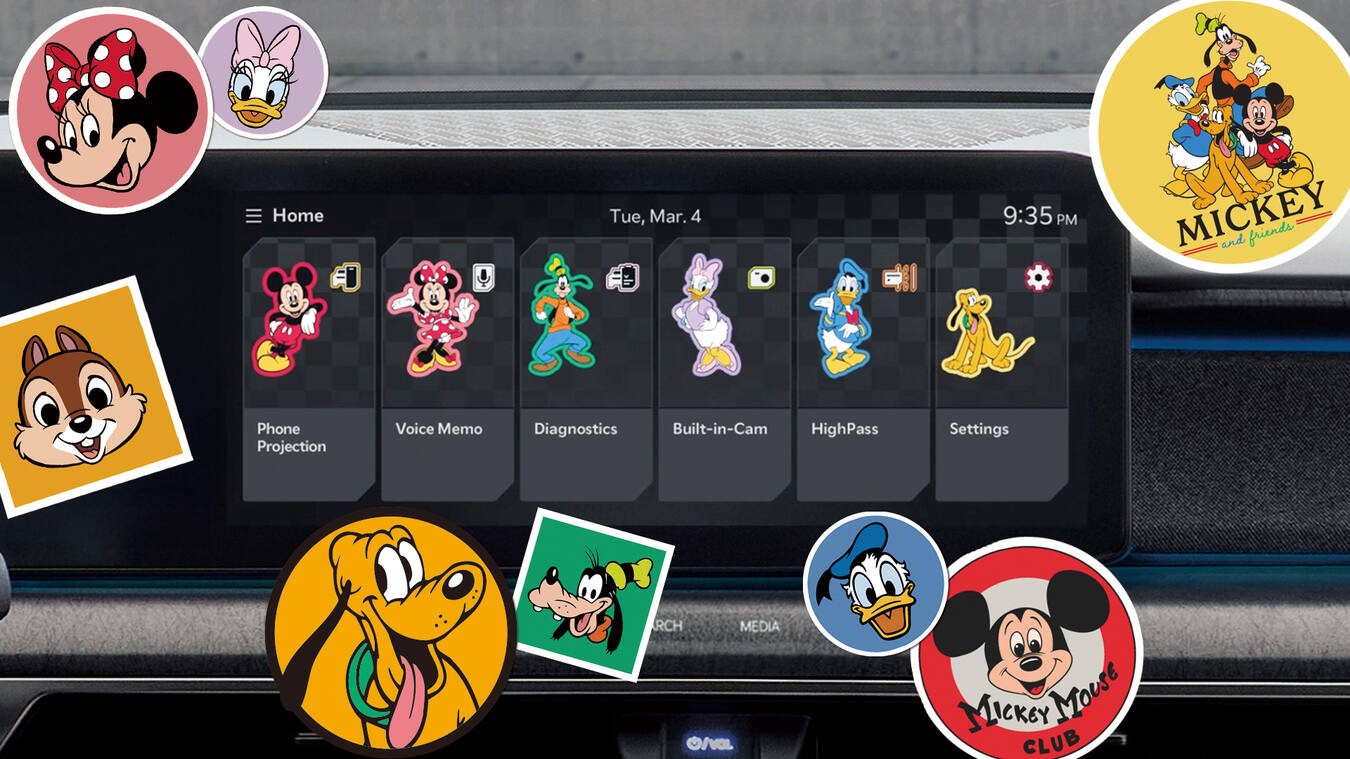
Select newer Kia models can now download Display Themes featuring Disney, Pixar, Marvel, Star Wars™ and National Geographic — and these aren’t just simple wallpapers.
The themes can transform the look of your digital dashboard and infotainment system with custom colors, graphics, character artwork and even animations that appear when you start or turn off your Kia.
So yes, you can actually get into your Kia and be greeted by some of your favorite Disney characters.
And if you already drive a newer Kia, there’s a chance your vehicle is eligible right now.
What Are Kia Display Themes?
Think of them like downloadable digital makeovers for your Kia.
Instead of being stuck with the standard look of your instrument cluster and infotainment system, compatible Kia models allow you to purchase and download different Display Themes through the Kia Connect Store.
Kia currently offers themes inspired by:
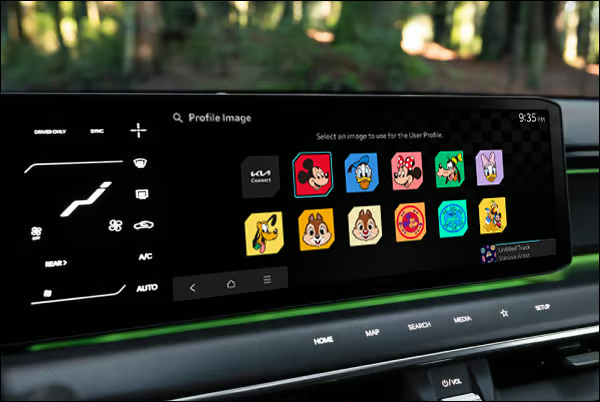
Disney — including Mickey & Friends and other iconic Disney characters

Pixar — including favorites like Toy Story

Marvel — including Avengers-inspired designs

Star Wars™ — bringing a galaxy far, far away right to your dashboard

National Geographic — featuring nature and photography-inspired design
Kia plans to continue expanding the collection, with approximately 30 Disney-family themes planned by the end of 2026.
They’re More Than Just Wallpapers

This is what makes the feature so cool.
Depending on the theme and your vehicle, Display Themes can change different elements throughout your Kia’s digital cockpit.
You may notice:
- Custom instrument-cluster graphics
- New colors and backgrounds
- Character artwork
- Customized dashboard elements
- Themed infotainment graphics
- Start-up animations
- Shut-down animations
- Different visual elements throughout your drive
Kia describes the themes as a way to customize not only the appearance of the vehicle’s screens, but also the overall personality of the digital experience.
So your dashboard can actually feel noticeably different when you switch themes.
Which Kia Models Can Get Disney Display Themes?
Here’s the important part: it’s based more on your Kia’s technology than simply the model name.
In the U.S., Display Themes require a compatible ccNC (Connected Car Navigation Cockpit) infotainment system and 12-inch/12.3-inch digital cluster.
That means Display Themes are available on select newer Kia models and trims rather than every vehicle within a particular model lineup.
Kia has confirmed compatibility or Display Theme availability on newer versions of models including:
- Kia EV9
- Kia EV6
- Kia K4
- Kia Sportage
- Kia Sorento
- Kia Carnival
- Kia K5
- 2027 Kia Telluride
- Additional compatible Kia models equipped with the required ccNC technology
Not every trim or model year is necessarily eligible. The easiest way to know whether your Kia can get the themes is to check your vehicle through Kia Connect.
Wait… My Kia Might Already Be Able to Do This?
Yes!
If you own a newer Kia with the compatible technology, you don’t have to buy a new car just to get a Disney theme.
Kia’s Display Themes are digital features that can be downloaded to eligible vehicles.
You’ll need an active Kia Connect subscription, and your Kia needs to have the required ccNC infotainment system and digital cluster.
How to Check Your Kia
Start by signing into your Kia account and checking the Kia Connect Store.
Look for Display Themes under the available digital features for your vehicle.
Because your account is connected to your vehicle, this is a much better way to check compatibility than simply searching by model name.
If Disney, Pixar, Marvel, Star Wars or National Geographic Display Themes appear as available for your vehicle, you’re in business.
How Do I Download a Disney Theme to My Kia?
Once you’ve purchased a compatible Display Theme through the Kia Connect Store, Kia makes applying it pretty simple.
In your Kia:
1. Open Setup
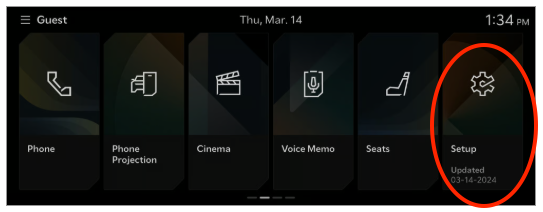
From your infotainment screen, go into your vehicle’s Setup menu.
2. Select Screen Layout
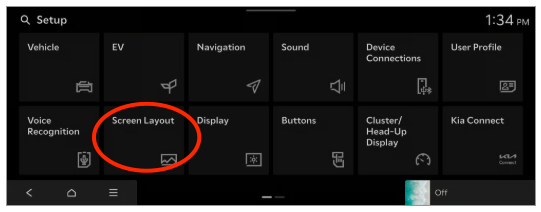
Look for Screen Layout in your settings.
3. Select Display Themes
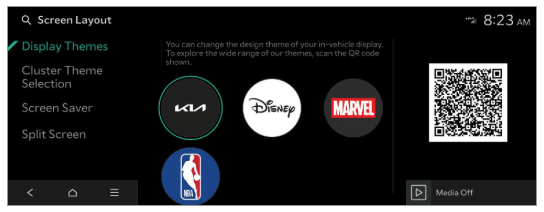
Choose Display Themes to see your available options.
4. Choose Your Theme
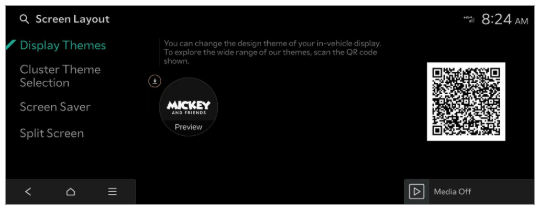
Select the theme you’ve purchased and download it to your vehicle.
5. Let It Download
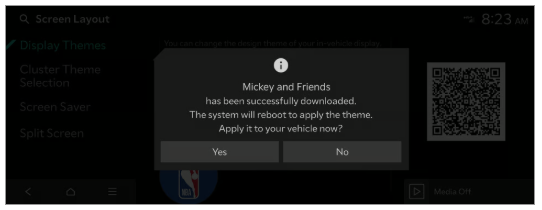
The download may take a few minutes depending on your connection.
6. Restart When Prompted
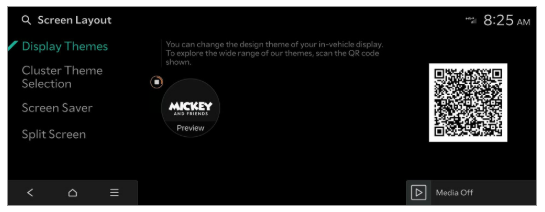
The system may need to restart before your new theme can be applied.
7. Ready To Go!
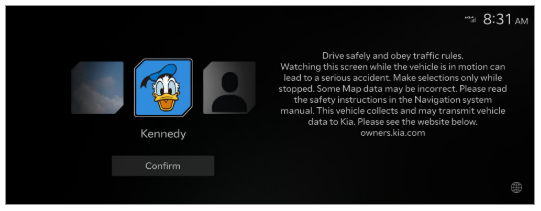
Then you’re ready to drive with your new look.
Don’t See “Display Themes” in Your Settings?
Don’t panic just yet.
Kia says vehicles need the latest compatible infotainment software for the Display Theme settings menu to work properly.
Check whether your Kia has an available software update first.
Kia supports Over-the-Air updates on many newer models, so some updates can be delivered directly to the vehicle.
If your Kia is fully updated and you still don’t see Display Themes, your particular model, model year or trim may not have the required hardware.
Do Kia’s Disney Themes Cost Money?
Yes. Kia currently lists Disney, Pixar, Marvel, Star Wars™ and National Geographic Display Themes as paid purchases in the U.S. Kia Connect Store.
Once you purchase a theme, it’s tied to that specific vehicle and cannot be transferred to another Kia.
You’ll also need an active Kia Connect subscription for Display Themes to remain operational.
And Kia Isn’t Stopping With Disney
Here’s another cool part: Display Themes are becoming an entire ecosystem within Kia vehicles.

Kia has already offered themes for all 30 NBA teams and even released FIFA World Cup 2026™ themes.
That means your vehicle’s digital dashboard is becoming another customizable part of your Kia — almost like changing the watch face on a smartwatch or the background on your phone.
And with over-the-air software updates, Kia can continue adding new digital experiences without changing the physical vehicle.
Want to Know If Your Kia Can Get Disney Display Themes?
If you’re driving a newer Kia and wondering whether your vehicle is compatible, check the Kia Connect Store or ask our team at H+H Kia in Omaha.
And if you’re shopping for a new Kia, let us know that Display Themes are on your wish list. We can help you find a model and trim equipped with the technology needed to access them.
Because choosing between Mickey Mouse, Pixar, Marvel and Star Wars™ might officially be one of the most fun decisions you’ll make when customizing your Kia.
What if your Kia could feel a little more like Disney World every time you started it?
Kia has teamed up with Disney to bring some seriously fun customization options to select newer Kia